Intelligent Bot Management
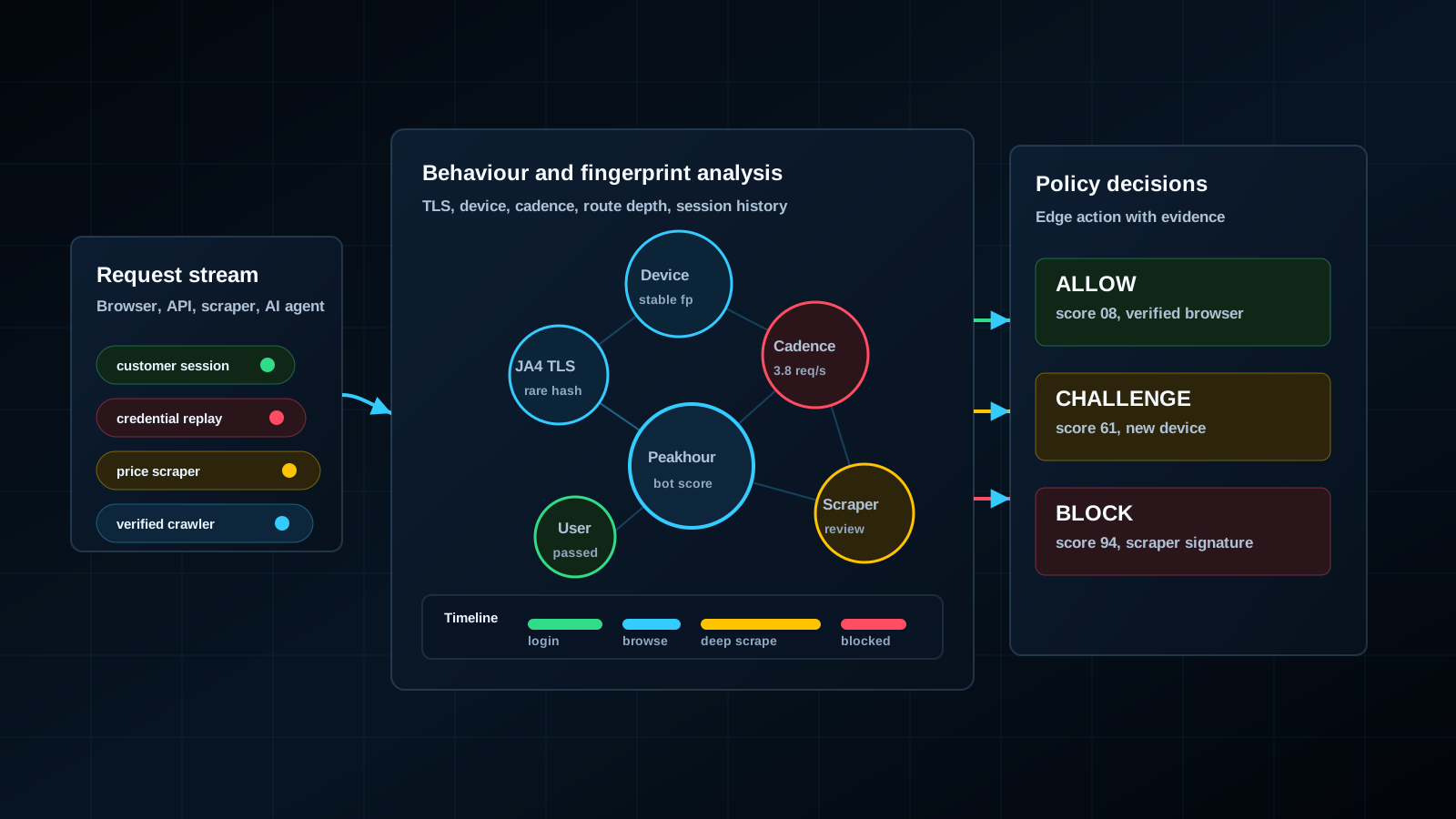
Control bots that try stolen passwords, scrape content, or overload your website and APIs. Peakhour uses IP, proxy, fingerprint, and request behaviour signals to allow, challenge, rate limit, or block requests. Review the results in logs and dashboards to tune your rules.
Plan setup, a trial, and ongoing review
Start with the pages where bots cause a clear problem, such as login, search, or checkout. Bring those URLs, request volumes, your current CDN, and your goals to a setup and pricing discussion.
- Choose the setup. Discuss Peakhour Edge or adding Peakhour intelligence to your current CDN or edge provider. Confirm which approach fits your application and who will manage the rules.
- Agree on a trial plan. Choose the pages to assess and record current request rates, failed logins, and successful customer visits. Agree on the scope, timing, and costs with the team.
- Review the controls. Check allow, challenge, rate limit, block, and log actions against the traffic on each page. Review useful crawlers and customer requests before expanding the rules.
- Set up logging. Use request logs and dashboards to review actions and traffic changes. Log Forwarding can send enriched request logs to your security monitoring tools, storage, or an HTTP endpoint.
During the evaluation, check whether unwanted requests fall, whether the application handles less bot traffic, and whether customers can still complete their tasks.
Where Sophisticated Automation Gets Past Simple Bot Rules
Bots can rotate IP addresses, browser fingerprints, credentials, and request rates. Review how they use each page to choose suitable controls.
Private Networks Evade Static Lists
Attackers increasingly assemble private and residential proxy networks before public datasets can label them. Review proxy status alongside request behaviour when choosing a response.
Fingerprints Drift Under Pressure
Anti-detect browsers and automation frameworks alter TLS, HTTP, browser, and device signals. A decision model has to compare those changes with behaviour and route context.
Route Abuse Needs Route Context
Ten requests per second means one thing on a static asset and another on login, checkout, search, or account APIs. Peakhour applies controls where the business risk appears, including rate limits and Layer 7 DDoS response when volume turns into origin pressure.
Review Each Action
Allow, challenge, rate limit, block, and log decisions stay tied to the signals that drove them, so teams can tune policy without guessing.
How Peakhour Assesses Bot Requests
Peakhour scores each request from the context that actually changes the decision: IP intelligence, residential proxy detection, network and browser fingerprints, route and rate behaviour, credential exposure, API path state, DDoS pressure, and WAAP/WAF findings. Use Peakhour Edge as the delivery layer, or add Peakhour intelligence to your existing CDN or edge provider without moving every workload at once.
-
IP intelligence and residential proxy signals
-
Network, TLS, HTTP, and browser fingerprinting
-
Route-aware rates and behaviour baselines
-
Credential, account, and API context
-
WAAP/WAF findings and decision logs
-
Layer 7 DDoS pressure and origin-protection context
High-Value Threat Focus: AI and LLM Scraping
Precise Control at the Decision Point
Review Bot Traffic and Rule Results
Use dashboards, logs, and event streams to review attack types, request actions, affected pages, and rate limits over time. Check valid requests that were challenged or blocked, then adjust the rules as needed.
Review bot categories, request actions, and traffic trends together.
Connect Bot Decisions to the Rest of the Request Path
Residential Proxy Detection
Use per-request proxy signals when attackers rotate through consumer networks and private proxy infrastructure.
IP Intelligence
Attach managed reputation, category, ASN, and infrastructure context to bot scores before request action.
Advanced Rate Limiting
Set request limits by route, IP, ASN, fingerprint, response code, and bot state.
DDoS Protection
Control bot-driven Layer 7 floods with request policy, route-aware rate limits, and origin protection before traffic reaches the application.
API Security
Protect login, checkout, account, token, REST, GraphQL, and WebSocket routes with API-aware bot context.
WAAP and WAF Controls
Run bot, API, WAF, rate, and DDoS decisions as one application security operating model.
Log Forwarding
Send enriched bot, proxy, route, API, and WAAP decision logs to the tools your team already reviews.
Plan Your Bot Management Evaluation
Related evidence
Bot Pressure Reduced in Production
Customer examples that connect Peakhour controls to production outcomes.

Pharmacy Direct
Healthcare Security & Bot Protection
Australia's first online pharmacy secured patient data and prevented healthcare fraud whilst saving their $900k platform investment.

Kitchen Warehouse
COVID-19 Traffic Surge Success
Australia's #1 online kitchenware retailer thrived during unprecedented COVID-19 traffic with 150% revenue growth.

Gumtree
Improving Traffic Quality and Reclaiming Platform Control
Gumtree, Australia's leading marketplace, battled significant bot traffic that skewed analytics, enabled scammers, and increased infrastructure costs. Peakhour's bot management solution improved the origin traffic mix, cleaned up campaign analytics, protected A/B testing data, and created a new revenue stream.
Learn More About Bot Management

Bad Bot Countermeasures
Bad bots can significantly impact your website and are hard to detect. Here we detail best practice on how to combat the growing threat from bad bots.
Read More
Residential Proxies, Friend or Foe?
This article explores the world of residential proxies, revealing the challenges and ethical questions they pose in our GeoIP-dependent digital landscape.
Read More
Understanding Bot Management: From Basic Protection to Advanced Threat Mitigation
A comprehensive guide to bot management, differentiating between basic, intermediate, and advanced protection strategies against evolving bot threats.
Read More
Browser Fingerprint Signals and Bot Detection
How browser, network, proxy, route, and behaviour signals support defensive bot decisions without becoming a fixed identity.
Read More
Price transparency needs governed automation
Price comparison increasingly depends on current web and API data. See how governed automation separates intended access from abusive extraction.
Read MoreCompare bot management options
Use these guides to check how each provider fits your traffic and your team's work. Record the tests, results and owners in the security evaluation worksheet.