

Content Delivery Networks (CDNs) are common on business websites. CDNs speed up websites by storing website content and assets in caches on servers spread around the world. These caches are typically key/value stores. For example, let's say we are requesting an image found at:
https://www.example.com/someimage.jpg
Depending on how the CDN works internally, it may use /someimage.jpg (the key) to retrieve the image (the value) from its cache. Most CDNs are fairly rigid in what they use as keys, complicated to configure (eg requiring programming skills), or charge more for flexibility.
The Peakhour.io CDN cache keeps configuration flexible while still supporting fine-grained control of caching behaviour for your application.
The Peakhour.IO cache key consists of a primary key, sub key, and secondary key. Both the primary and secondary key must match to constitute a cache hit.
Primary key
The primary key is the key from the client request that uniquely identifies a resource. It consists of the scheme, host, path and query string from the request. Within our cache, the primary key may be augmented from other elements of the request, such as the presence of a particular header, or a header value such as a cookie value. At Peakhour.IO, we call these augmented keys cache subkey vars.

The following options can further manipulate the primary key by specifying how the query string is handled. These options include ignore query string (useful for defeating cache-busting techniques) or stripping certain tags (commonly UTM tags).
Secondary key
The secondary key describes parts of the request message that influenced the content of the response from the origin. This information is stored in the secondary key and the following headers are used:
- Vary
- Content-Encoding
- User-Agent: (browser/mobile)
- Accept-Language
- Variant-06
Servers are commonly misconfigured and can send back headers that don't match the behaviour of the content. For example, it is very common for a server to send back a Vary header with Vary: user-agent. When you check the behaviour by sending different user agents, though, the content doesn't actually change. This can cause unnecessary cache fragmentation and lower hit rates. Peakhour allows you to override/ignore origin behaviour to correct this.
If you prefer a visual view, the diagram below shows all the elements of a request/response that could make up a cache key.
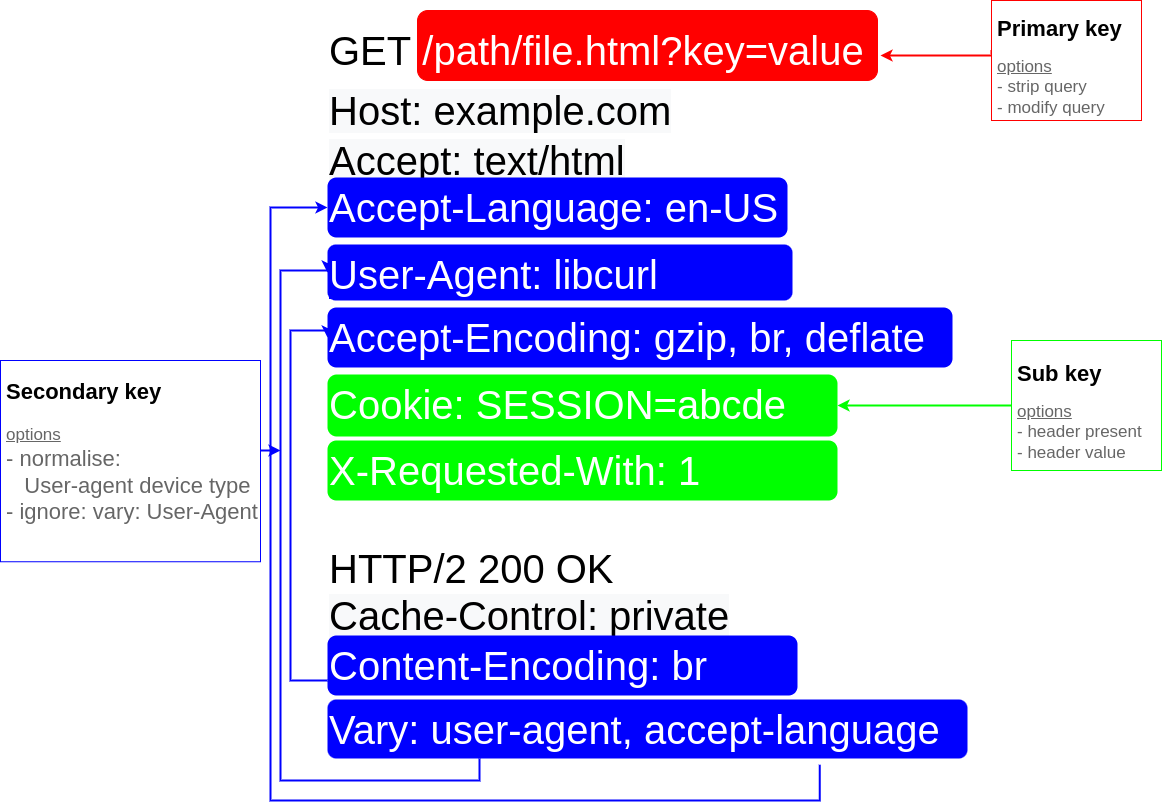
For more flexibility, Peakhour.io can use specific Cookie values in the secondary key. This is useful for Content Management Systems like Magento, which set a special cookie, X-Magento-Vary, to enable special caching behaviour that wouldn't normally be achievable; for example, whether the user is logged in, is part of a special group, or has chosen a different currency.
How can I see my keys?
Cache keys are generated on the fly based on the client's request and the origin's response. To see a cache key, enable Debug headers in the Peakhour.IO dashboard. As an example, for the given request/response pair:
GET / HTTP/1.1
Accept-Encoding: gzip, deflate, br

HTTP/1.1 200
Vary: accept-encoding
content-encoding: br
Peakhour.IO would generate the following cache-status header:
cache-status: peakhour.io; fwd=uri-miss; key="https://example.com/what-is-new.html"; secondary-key="encoding::br"; stored; ttl=31536000
Here, the key is the scheme://host/path and the secondary-key is the encoding served by the origin.
What's in it for me?
By understanding cache keys and how they are constructed, a web application can tailor its responses to better utilise a cache. The configuration options give you direct control for fine-tuning cache-key handling, improving user experience and cache hit rates.