

Rate limiting prevents servers from being overwhelmed by too many requests in a short period of time. Typically, rate limiting is configured using rules made up of a filter, for example a path like /login, and a limit on the number of requests a user can make in a given time, such as 10 requests in a minute. If a user exceeds this limit, they are usually blocked for a timeout period.
But how do you identify a user? Traditionally rate limiting has used the IP address for grouping requests, assuming that requests from the same IP address will be the same user. That assumption is now weak. IP addresses are rarely static and are often shared. For example, an office network might have hundreds of individual computers in it but present a single IP address for all those computers to the internet. Mobile operators commonly use carrier-grade network address translation (CGNAT) to share the same IP across thousands of devices or users. Bot networks, seeking to avoid security controls like rate limiting, will rotate their requests through thousands of different IP addresses. This makes rate limiting based on IP addresses a poor choice from both a functional and a security perspective.
Introducing Advanced Rate Limiting
Peakhour's Advanced Rate Limiting service lets you create filters using any HTTP request characteristic, for example URI, request method, headers, cookies, country, network fingerprints and more. You can also use response headers and response codes, so a rule can count failed login attempts, repeated 404s from a scraper, or traffic that crosses an API threshold.
For counting requests you can use the following fields for grouping:
- IP Address
- ASN
- Country Code
- HTTP/2 Fingerprint
- TLS Fingerprint
- Any combination of Request Headers
You can use one of those fields, or a combination of them, to identify users with more control than IP address alone.
You can also separate the filter and mitigation expression. For example excessive attempts to /login can be blocked on the entire site.
This matters because rate limiting is not just a request counter. In Peakhour it sits beside bot management, WAF, DDoS protection, traffic controls, and origin shielding on the same managed edge path. That gives operators a practical way to set different thresholds for verified crawlers, suspicious automation, authenticated API clients, and normal visitors without pushing every policy change into the application. It also gives them allowed, blocked, and threshold-hit evidence to tune the rule after it is deployed, whether Peakhour is the active edge or adding controls beside an existing CDN or cloud edge.
Putting it into action
Advanced Rate Limiting can help protect applications from attacks like Layer 7 DDoS, Account Takeovers, Credential Stuffing, and more. Here are some real world examples you can configure using our dashboard and API.
Protect against general site abuse
Our example website is a medium-sized ecommerce store that has page URLs ending in /. It serves Australian clients and typically sees around 100 page requests a minute from non-search-engine traffic during peak traffic times. With that baseline, we can set up rate limiting to prevent general site abuse and protect against layer 7 DDoS attacks.
Peakhour rate limiting starts with zones. You specify your request limits in these zones.
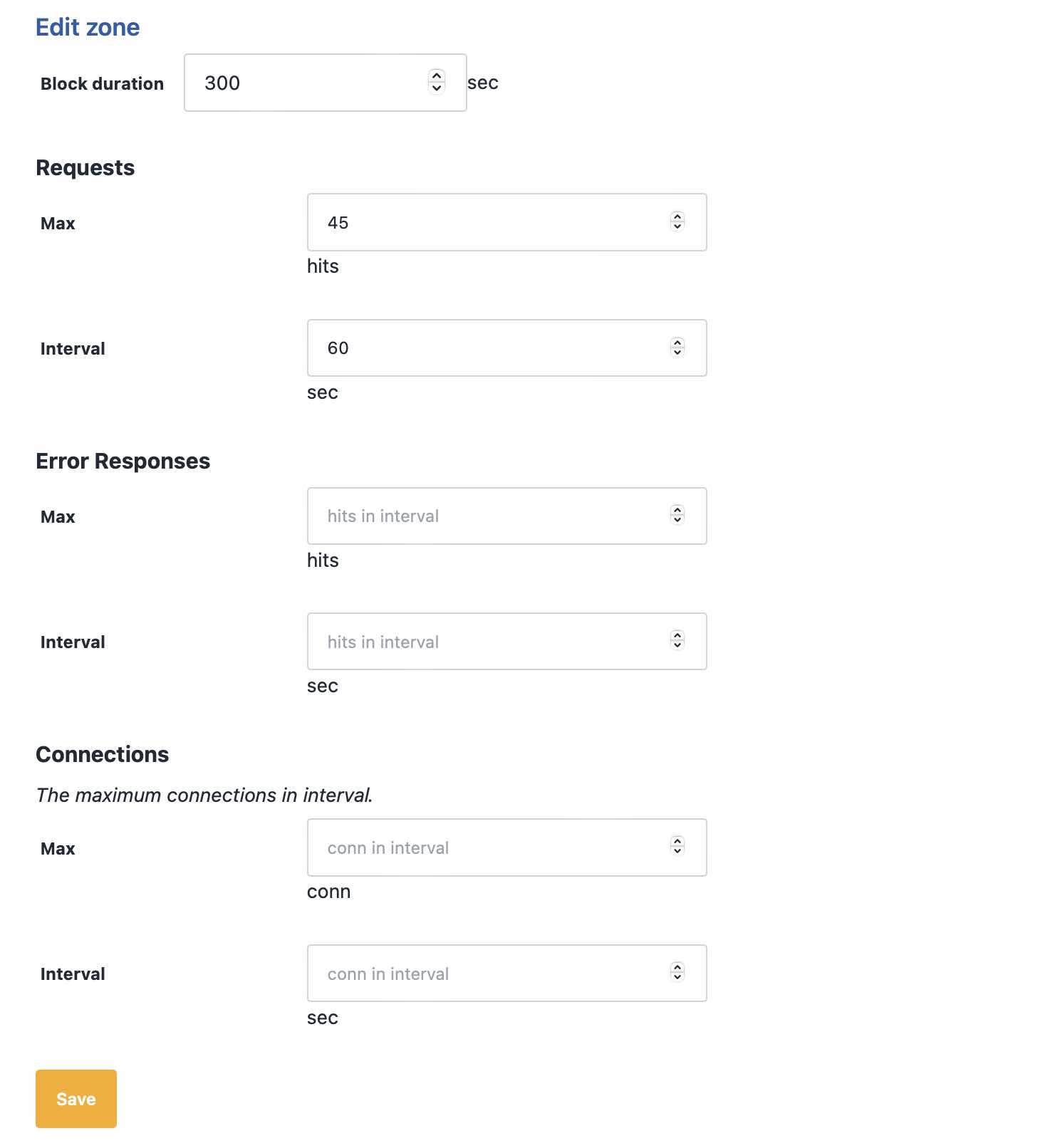
Here we've specified a maximum of 45 requests in 1 minute. We're going to apply this limit to page loads only. Since our typical maximum for all users on this website is 100 in a minute, it seems reasonable that a real user is not going to view 40 pages in 1 minute. We could also specify a value for error responses in a minute. An error could be a 404, which a scraper might typically get when looking for removed URLs.
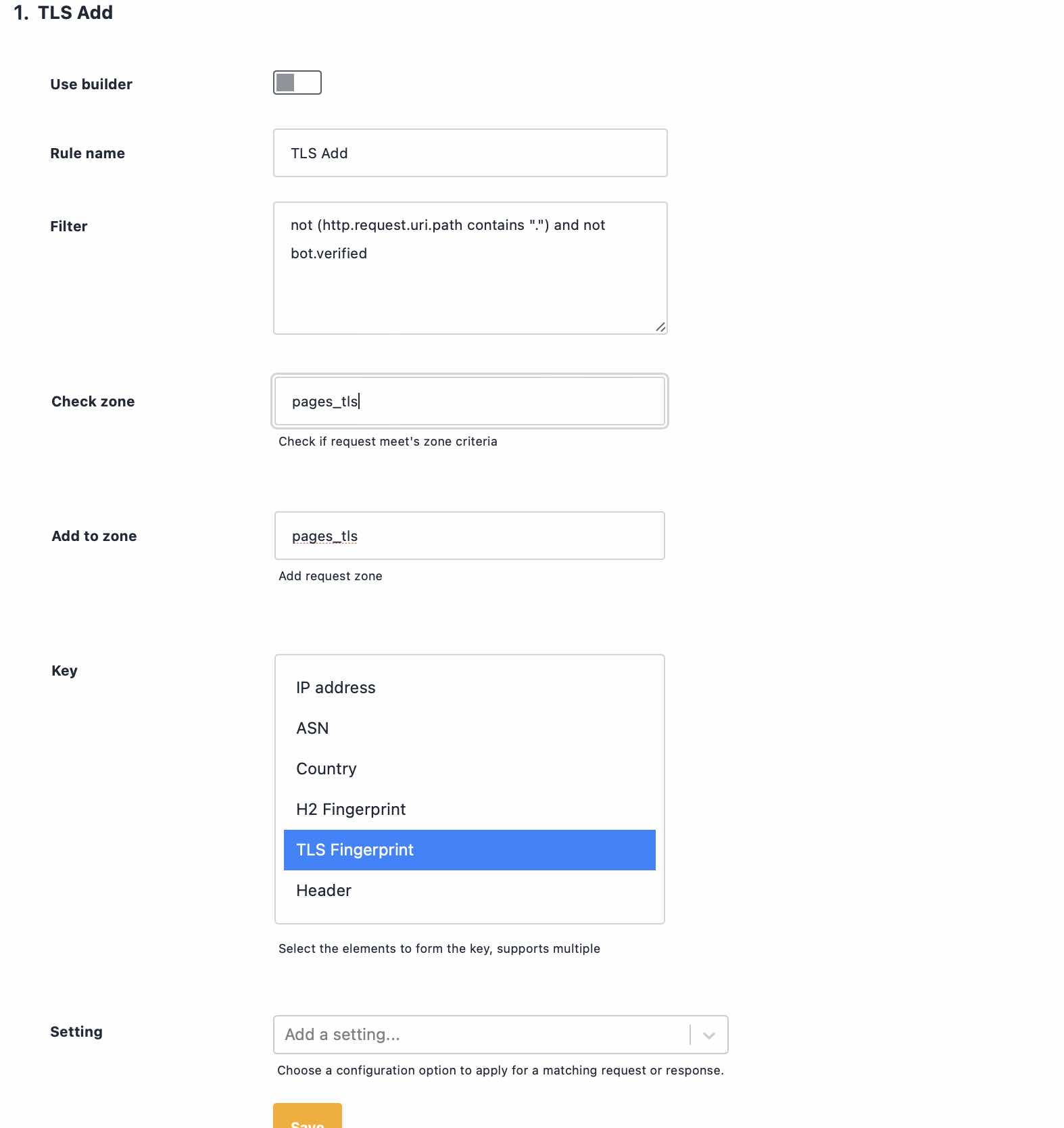
Now let's define our filter and our counter. For our filter we mentioned that pages end in /, so we'll use that, but exclude verified bots to make sure they're not restricted when crawling the site. A verified bot is a crawler like Google or Bing, that Peakhour has verified as legitimate by using reverse DNS to confirm they are who they say they are.
Attackers, scrapers, and others looking to abuse a site will launch an attack using a particular piece of software. That piece of software will have a TLS fingerprint (like JA3) that remains the same, even as the attacker rotates their user-agent, IP address, and other characteristics, so we'll use the TLS fingerprint as our request counter.
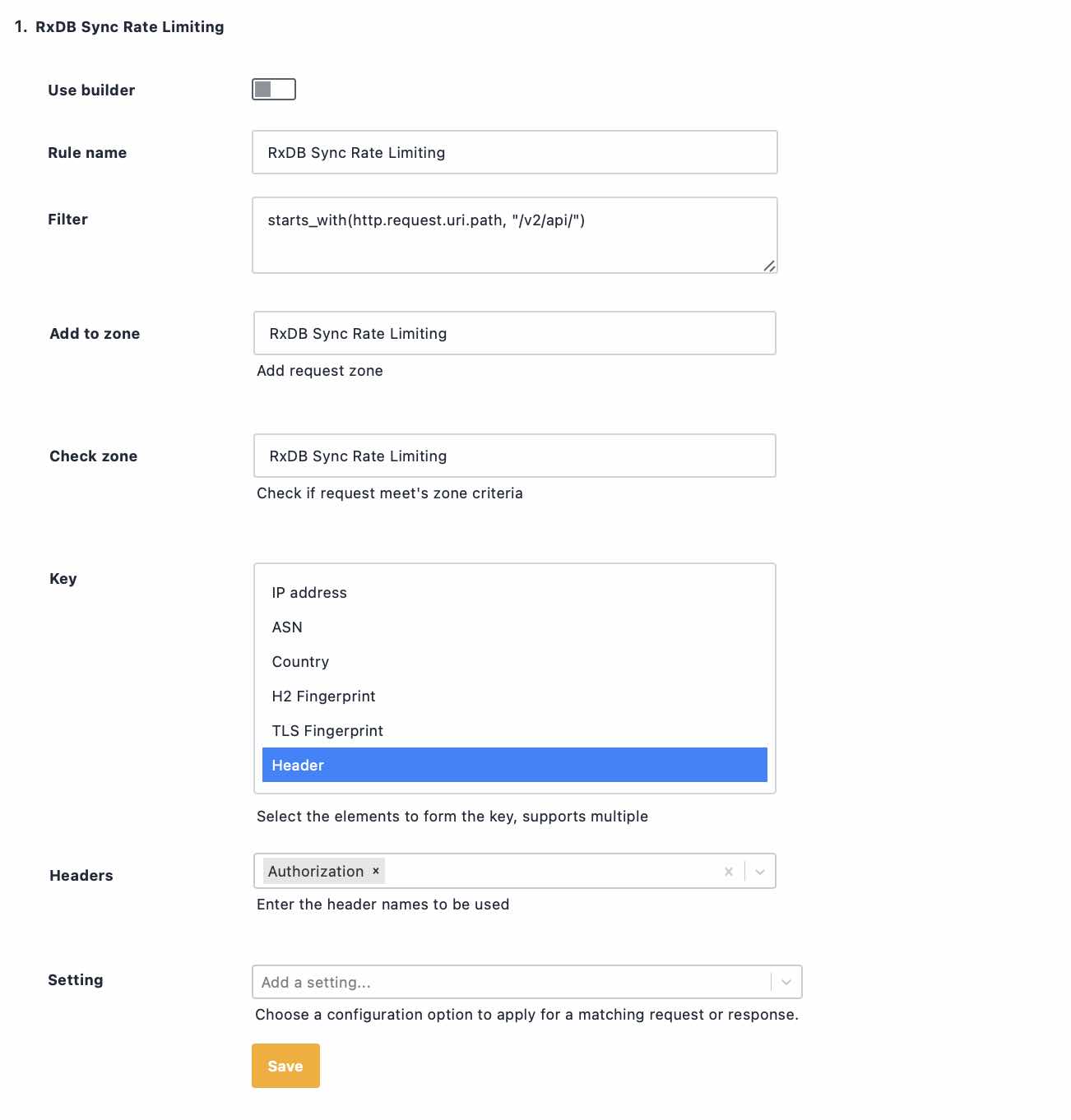
Rate Limit authenticated API Users
It is common for APIs to require an Authorization header as part of the request to authenticate access. By grouping requests on the value of this header, we can rate limit a specific API client even if it uses multiple applications, or if its credentials are stolen.
Protecting from Account Takeovers
Account Takeover attacks have been in the news recently, with several high-profile websites being victims. Credential Stuffing and Brute Force attacks rely on attempting lots of logins to identify valid credentials. Along with lots of attempts come lots of failures. Attackers will rely on software like openbullet to carry out their attacks, using proxy networks to constantly rotate IP addresses and defeat traditional rate limiting.
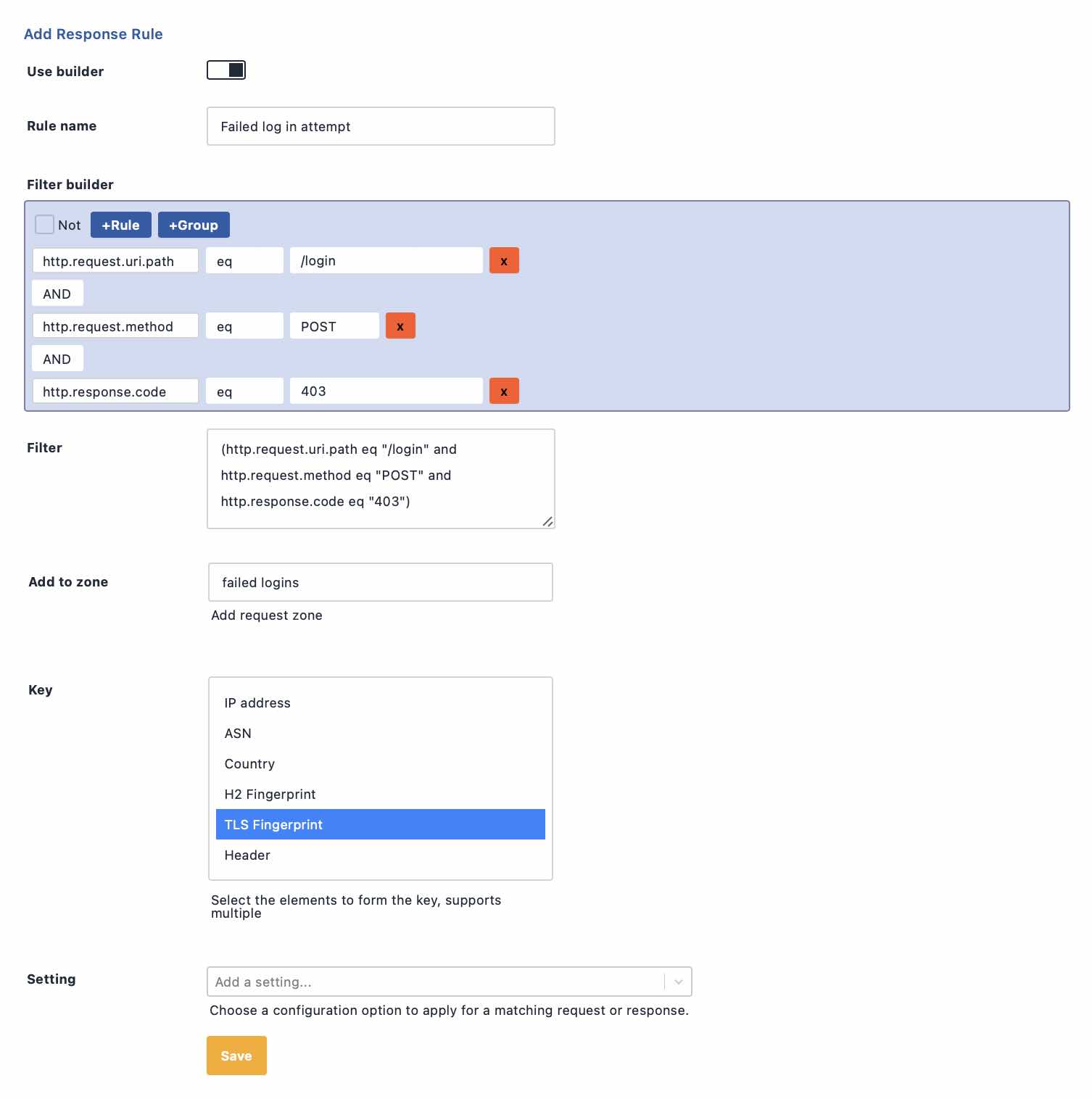
The program the attacker is using will present a consistent TLS fingerprint. We can make a special rule for our login form that tracks failed login attempts by TLS Fingerprint, effectively tracking the attacker as they rotate IP address.
If the attack is low and slow, we can track failed attempts over a longer timeframe by using the response from the server when adding to our counting zone.
Final Thoughts
Advanced rate limiting is a practical response to the limits of IP-based controls. IP address rotation is the standard amongst attackers and scrapers, rendering the traditional approach obsolete. Useful protection now needs to identify the actor behind the requests, protect the origin before expensive application work is triggered, and give teams enough evidence to adjust the policy without guesswork. Counting requests against a combination of network fingerprints, request fields, response signals, and bot context is how you stop abuse from scrapers, SEO spiders, and layer 7 attackers without treating every visitor the same.