

Prestashop is a popular open source eCommerce platform written in PHP. We're releasing a Prestashop module that enables full page caching through Peakhour. Pages can stay cached at the Peakhour edge for longer, and the plugin refreshes them when the underlying content changes in Prestashop.
Full Page Caching reduces load times by removing the time it takes for a CMS to generate a dynamic page. That is typically around half a second for a quick page, and 3-5 seconds for a slow one. Here is a cache miss and hit from our client fatburnersonly.com.au:
 A typical cache miss on a category page. The origin has to generate the page, taking 2.49 seconds
 A cache hit: only 35.7 milliseconds to deliver to the client from our edge
Nearly 2.5 seconds removed from Time to First Byte and Largest Contentful Paint. That's without changing the site itself.
Tag Based Flushing
Like all our recent plugins, the Prestashop plugin adds a header with tag metadata for each cacheable page. This header is called X-Prestashop-Tag and contains the IDs of the relevant entities on the page, eg products, categories, brands, pages, etc. This metadata is stored alongside the cached page. When an entity changes in the Prestashop admin, eg a product price is updated, the plugin issues a flush-by-tag request to Peakhour. Peakhour finds the pages with the associated tag and invalidates them in the cache. The next request for the page passes through to origin and is then re-cached.
 Headers returned by the [caching plugin](/blog/opencart/opencart-3-caching-plugin/).
Custom TTL
TTL (Time to live) is the time a resource stays in cache before the cache checks for a new version. You can control this within the plugin. The plugin then sets the peakhour-cdn-cache-control header, part of the new cdn-cache-control specification, so only Peakhour responds to the cache directive.
Ajax Mini Cart
Mini carts are dynamic sections of eCommerce websites, and they often stop pages from being cacheable. The Peakhour plugin loads them via Ajax so as many pages as possible remain cacheable.
 The mini cart is in the top right; it is usually returned as part of the generated page.
Cache varying
The same page can show different information depending on factors such as whether a user is logged in, or whether a multicurrency store changes currency. The Peakhour Prestashop plugin handles this by changing a cookie value when those factors change, creating separate cache regions for the different possibilities.
The Results
The Peakhour Prestashop plugin can improve store performance measurably. Our client fatburnersonly.com.au improved their 'good' web vitals scores by 20% in the two months they've been using Peakhour.
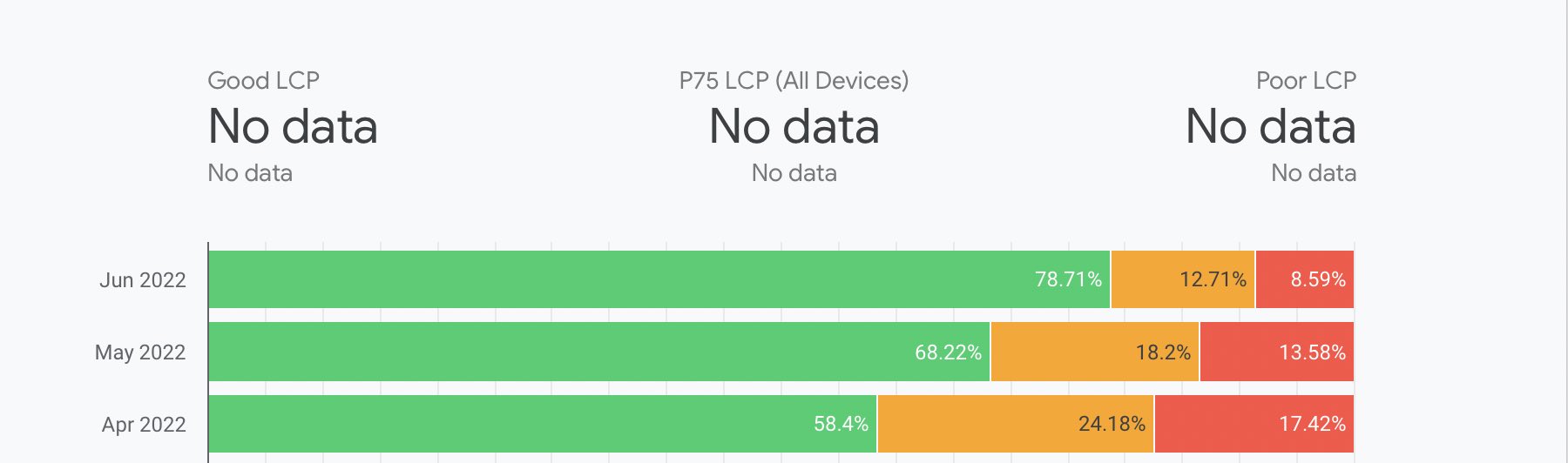 Full page caching was enabled halfway through May. Note that a significant number of pages, eg checkout and admin, cannot be cached and are included in these stats
Grabbing the plugin
If you have a slow Prestashop store, see our plugin page or contact us for more information.