

Google has announced that Interaction to Next Paint (INP) will replace First Input Delay (FID) as a Core Web Vital as of March 2024. Introduced as a metric in 2022, INP covers gaps in FID by measuring more of what happens after a user interacts with a page.
To help site owners prepare for its introduction as a Core Web Vital, INP is already included in the Chrome User Experience Report (CrUX). By analysing the CrUX data, website owners can see their current INP performance and make targeted optimisations ahead of the March 2024 change.
A better metric than First Input Delay
First Input Delay, as its name suggests, only measures the delay between an input, such as a keypress or mouse click, and the point where the browser begins to handle that event. It does not include the time spent processing the input. It only measures how long the browser was blocked before it could start handling it.
That leaves two issues: it only considers the FIRST event, and it does not measure how long it takes for the user to see the result of their input.
INP is designed to cover both issues. It measures the latency of ALL 'interactions' through to the visual response for that interaction. As explained by Google, an interaction like a tap on a touch screen device can consist of several input events.
"An interaction's latency consists of the single longest duration of a group of event handlers that drives the interaction, from the time the user begins the interaction to the moment the next frame is presented with visual feedback."
After measuring all interactions, the final INP score is the longest interaction observed, ignoring any outliers.
What Constitutes a Good Score
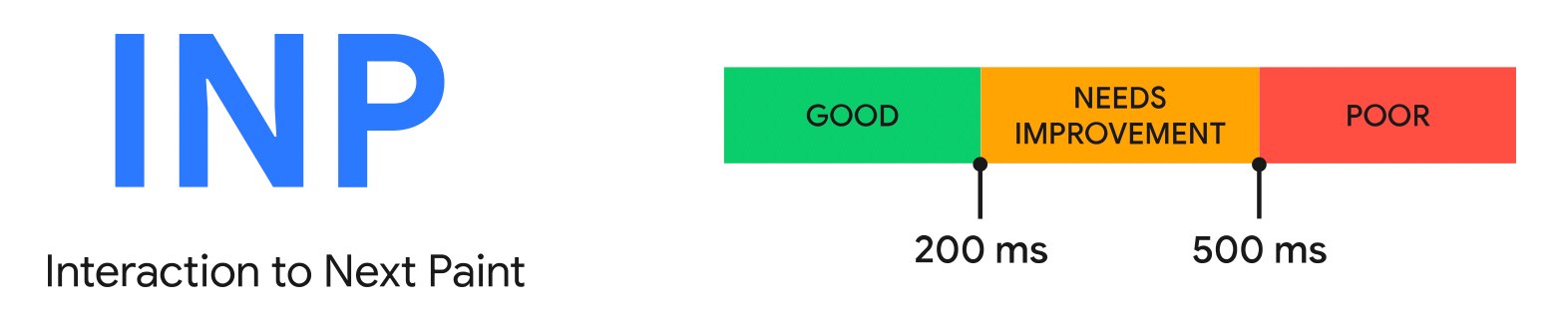
INP is measured in milliseconds (ms), with lower scores indicating better performance:
- Good: < 200 ms
- Needs Improvement: 200-500 ms
- Poor: > 500 ms
How to ensure you have a good INP score
Minimise Main-Thread Work
Long-running JavaScript can block the main thread and increase INP times. Break these tasks into smaller parts and run them asynchronously to reduce delays.
Efficiently Use Browser APIs
APIs that trigger layout recalculations can be expensive. Use them sparingly and look for alternatives that put less pressure on the browser.
Defer Non-Essential CSS and Scripts
Postpone the loading of non-critical CSS and JavaScript. Use techniques like asynchronous loading to improve INP scores.
Monitor Third-Party Scripts
Heavy third-party scripts can degrade INP performance. Use asynchronous or deferred loading for these scripts to limit their impact.
Conclusion
Google estimates that 90% of a user's time on a page is after it has finished loading. FID focused on first impressions, with the assumption that a fast start meant the page would stay responsive. Interaction to Next Paint addresses that gap and gives a more accurate view of user experience. If you want to know your current INP score, you can use our free website speed comparison tool to view it alongside your other Web Vitals, and see how your website compares to your competitors.