
In previous blog posts we've covered the benefits that full page caching has on page load performance. We also covered how caching pages lowers origin server utilisation, so the site can handle more customers. A lesser-known side benefit is protection against Layer 7 denial of service (DoS) attacks.
What is a Denial of Service attack?
The goal of a DoS attack is to make a network resource, such as a website or networked service, unavailable to users by overwhelming it with excessive traffic or requests. DoS attacks can be launched from a single source or from multiple sources (known as a distributed denial of service, or DDoS attack).
Typically, an attacker floods the web server with HTTP or API requests to try to overwhelm it. An attacker might also launch a 'slow attack', especially if they find a weak point in the application that consumes a lot of server resources for a single request. One example is repeatedly using a site search function. By slowing down the rate at which requests are sent, the attacker can bypass common rate-limiting and traffic-shaping mechanisms that are designed to block high-volume traffic spikes.
DoS conditions can also be inadvertent. A CMS like Magento or WordPress on an underpowered server can be overwhelmed, or slowed to a crawl, by so-called 'grey' bots. Examples include Semrush, Ahrefs, dotbot, and MJ12Bot. These spiders can crawl a site aggressively enough to bring it to its knees. Even Bing or Google can negatively impact a site.
What is Layer 7?
In networking parlance, Layer 7 refers to the actual application running on a web server. It is part of the OSI (Open Systems Interconnection) model used to describe the various functions in transmitting data over a network. The model is as follows:
- Layer 1 -> Physical Layer, responsible for transmitting raw bits of data, e.g., a wire or wireless link
- Layer 2 -> Data Link, responsible for transmitting data frames between network devices and detecting transmission errors.
- Layer 3 -> Network Layer, responsible for routing data packets between networks and determining the best path for transmission.
- Layer 4 -> Transport Layer, responsible for end-to-end communication between applications, providing reliable data transmission and flow control.
- Layer 5 -> Session Layer, responsible for establishing, maintaining, and terminating communication sessions between applications.
- Layer 6 -> Presentation Layer, responsible for formatting data to be presented to the application layer and for converting data from the application layer into a standardised format for transmission.
- Layer 7 -> Application Layer, responsible for providing services to the user, such as file transfer, email, and web access.
How Full Page Caching helps
Full page caching helps by reducing the number of dynamic requests to the server. Caching the entire page allows the server to serve pre-generated content to visitors, rather than generating it dynamically each time a page is requested. This reduces the server's processing load and helps prevent excessive requests from overloading the server or making it unavailable.
A real world example
As part of a series of Peakhour recommendations to 'harden' its website against layer 7 attacks, a Peakhour client (a government site) applied limited full page caching with a time to live of 10 minutes. This means that Peakhour will serve a page from its Edge cache for 10 minutes before hitting the origin again for a new version.
Not long after implementation, that change was tested: a DDoS originating from hundreds of IPs across multiple countries hammered a set of 5 pages. The attack was spread over several days with bursts of activity lasting about 15 minutes. With the first hit, the page was cached and every subsequent hit was served from our high-performance Edge cache. No slowdown was observed and the attackers gave up.
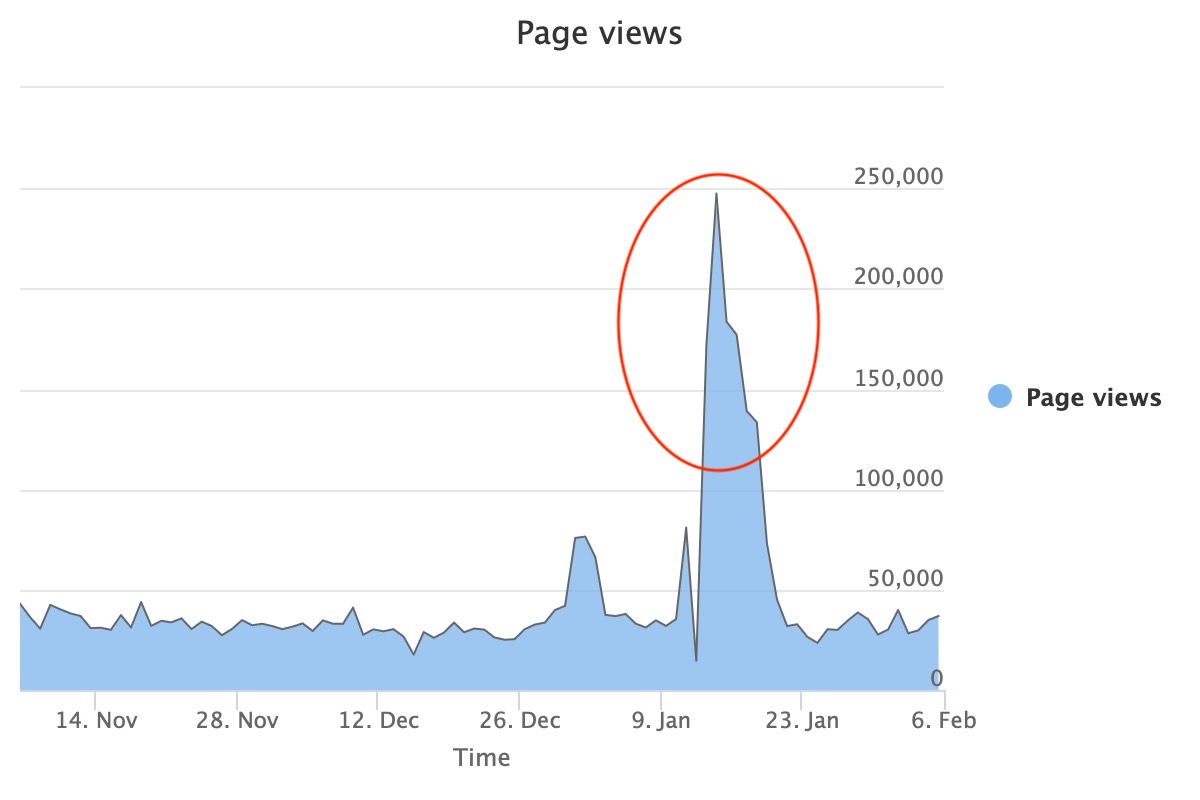 Real attack on a Peakhour client; the spikes formed in 15 minute bursts.
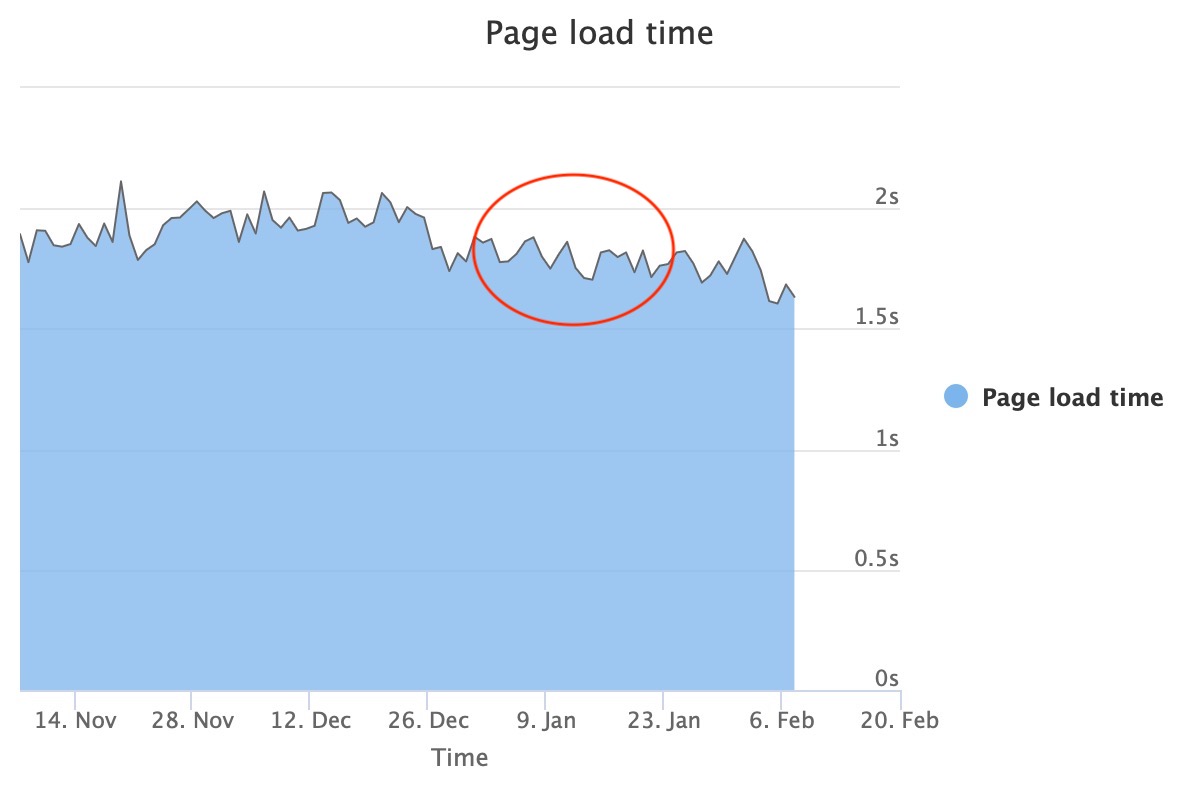 Real page load times measured in the client browser
But my site is dynamic...
Many websites have a small dynamic component on the page. For ecommerce sites this might be the mini cart in the top right showing the number of items in the cart, or it might be some personalisation for a user. Often these dynamic parts of the page can be rendered in the browser using Ajax or local storage, rather than rendered on the server. By moving the dynamic components to the browser, the full page becomes cacheable. Another option is to use Edge Side Includes (ESI), which enables the majority of the page to be cached in the CDN while the dynamic parts are fetched separately before serving the full page to the user.
Peakhour can help move dynamic page components from the server to the browser and cache more at the edge. We also have a range of CMS plugins that do just that. Contact us if you want some help.
Final Thoughts
Layer 7 DoS attacks have become more common than traditional DoS attacks, as they typically require far fewer resources from the attacker. Reducing dynamic requests to the origin using full page caching is a useful but underappreciated way to mitigate them. If you're concerned about website security, resilience, and performance, Peakhour helps you cache more so you can protect, accelerate, and scale your website.